Gabie Portal
Buyers find your boards. You set the price.
Advertisers browse your open boards and try an ad made to fit. When they ask for a price, it lands in your CRM. You answer with real rates.
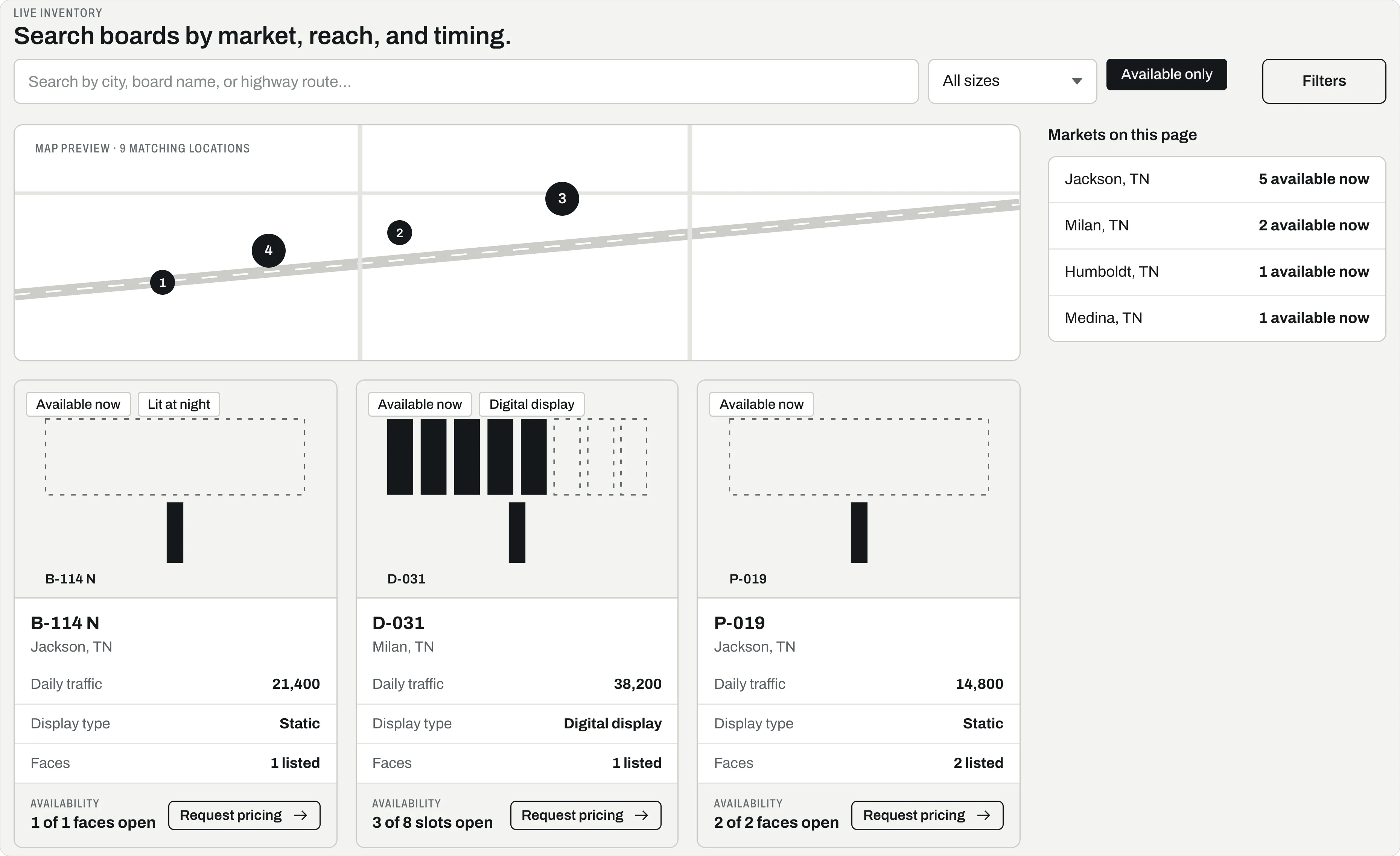
Every board gets its own page.
Buyers see the size, the traffic, the faces and what is open. It all comes live from your Gabie inventory.
- Search
- By city, board name or road. Filter by size, format and status.
- Map
- A map shows where each board is.
- Faces
- Each face says Available or Booked.
- No prices
- Your rates never show. Buyers ask, and you answer.
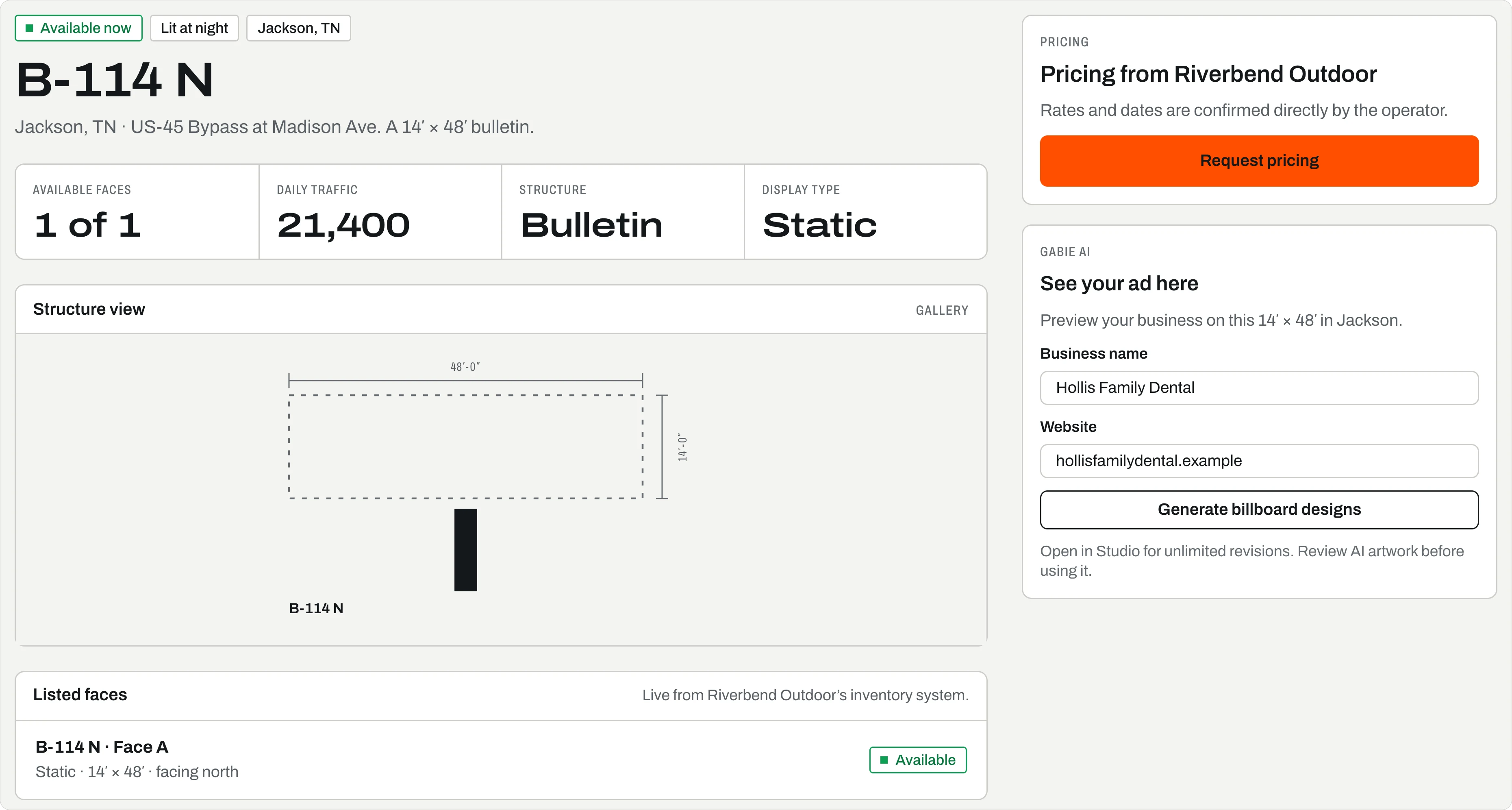
Buyers see an ad made for the board.
A buyer types in their business. Gabie makes two designs in the board’s shape, and they can change them three times.
- What they type
- Name, a few words, phone, website, and a logo if they have one.
- Two designs
- Flat art in the board’s shape. Not a photo of the board.
- Three changes
- Like “Make text bigger” or “Add more contrast,” right on the page.
- Open in Studio
- Takes the design into Studio to keep going.
Gabie AI
See your ad here
Preview your business on this 14′ × 48′ in Jackson.
Powered by Gabie AI
Business name *
Hollis Family Dental
Describe your business
Family dentist in Jackson. New patients welcome.
Phone Number
731-555-0118
Industry
Dental
Website
hollisfamilydental.example
Logo (optional)
Upload your logo · PNG, JPG, or SVG
Generate billboard designs
Then, while it works
Designing your billboard…
Designing 14′ × 48′ layouts for highway-speed readability.
2 designs
Flat artwork · not a photo of the board
Review AI artwork before using it.
The image model may still draw text, numbers, signs, or logos that you did not provide. Check every claim and contact detail in the image.
Refine your design
Make the approved text bigger, change background to blue…
Up to 3 changes here · more in Studio
Open in Studio ↗A price request lands in your CRM.
Gabie adds the buyer’s company, contact and a new lead to your CRM. Your rep answers with real rates.
- Company and contact
- Used again if you have them. Made new if not.
- A new lead
- Each request starts a lead in Prospecting, from the portal.
- The activity
- A line on the timeline names the buyer, the board and the face.
- No checkout
- No holds and no payments. Rates and dates come from you.
The advertiser · Portal
Request pricing
Share your contact details and Riverbend Outdoor will reply with pricing and face availability.
Business name
Hollis Family Dental
Contact name
Jen Hollis
jen@hollisfamilydental.example
Phone (optional)
731-555-0118
Message (optional)
Is B-114 N open in March? We would like three months.
Request pricing
Request sent. Riverbend Outdoor will reply with pricing and face availability.
One step,
all or nothing
The operator · Gabie CRM
New in the CRM
Riverbend Outdoor
- CompanyHollis Family DentalReused if it is already in your CRM
- ContactJen Hollisjen@hollisfamilydental.example · 731-555-0118
- LeadHollis Family DentalStage: Prospecting · Source: portal
Lead notes
Is B-114 N open in March? We would like three months.
With the board and the face she asked about.
Activity · face B-114 N
Portal request from Hollis Family Dental for B-114 N.
Next · your rep
Dana Ortiz answers with real rates and dates.
No hold, no checkout, no payment. The buyer asks, and the price comes from you.
Digital faces ask for your specs first.
A digital face has no AI preview. The buyer asks you for the size, the file types and the loop rules instead.
- Slots
- Shows how many slots are open, like 3 of 8.
- Your rules
- Pixel size, file types, loop length and dayparts come from you.
- Same request
- Buyers ask about dates and specs in one form.
- Not sure?
- If the open slots aren’t shared, it says Confirm with operator.
Static face · B-114 N
Listed faces
Live from Riverbend Outdoor’s inventory system.
B-114 N · Face A
Static · 14′ × 48′ · facing north
Gabie AI
See your ad here
Preview your business on this 14′ × 48′ in Jackson.
Generate billboard designs
Then · 2 flat designs at 14′ × 48′
Digital face · D-031
Listed faces
Live from Riverbend Outdoor’s inventory system.
D-031 · Face A
Digital · 14′ × 48′ · 3 of 8 rotation slots open
D-044 · Face A
Digital · 6 rotation slots
Digital artwork
Request the delivery specs
The operator’s inventory shares slot capacity, but not the technical profile needed to prepare final digital media.
Confirm pixel dimensions, accepted image or video formats, loop length, and daypart rules with the operator before creating final artwork. Use Request pricing to ask about availability and delivery requirements.
Where it sits
Where buyers find you.
Portal brings buyers to you, next to Scout. A design they start here can go on to Studio for the final art.
Sell the face. Find a buyer and sign the deal.
Run the ad. Put it up, prove it ran, and renew.
Portal questions
Does Portal run on its own inventory?
No. Portal pages show your Gabie inventory, so open dates and details stay in one place.
Can advertisers pay online?
Not through Gabie. An advertiser asks for pricing, you answer with rates and dates, and billing stays in your own system.
Does an advertiser need artwork before they ask for pricing?
No. “See your ad here” makes two designs at the board’s shape. They can finish one in Studio.
What can I send a prospect who has no login?
A footprint link. It’s a map of your boards near their locations, marked available or booked. No login needed. Links end after 60 days, or when you turn them off.
Put your boards where buyers look.
Sign up free and bring your boards in. Or book thirty minutes and watch a pricing request land in your CRM.